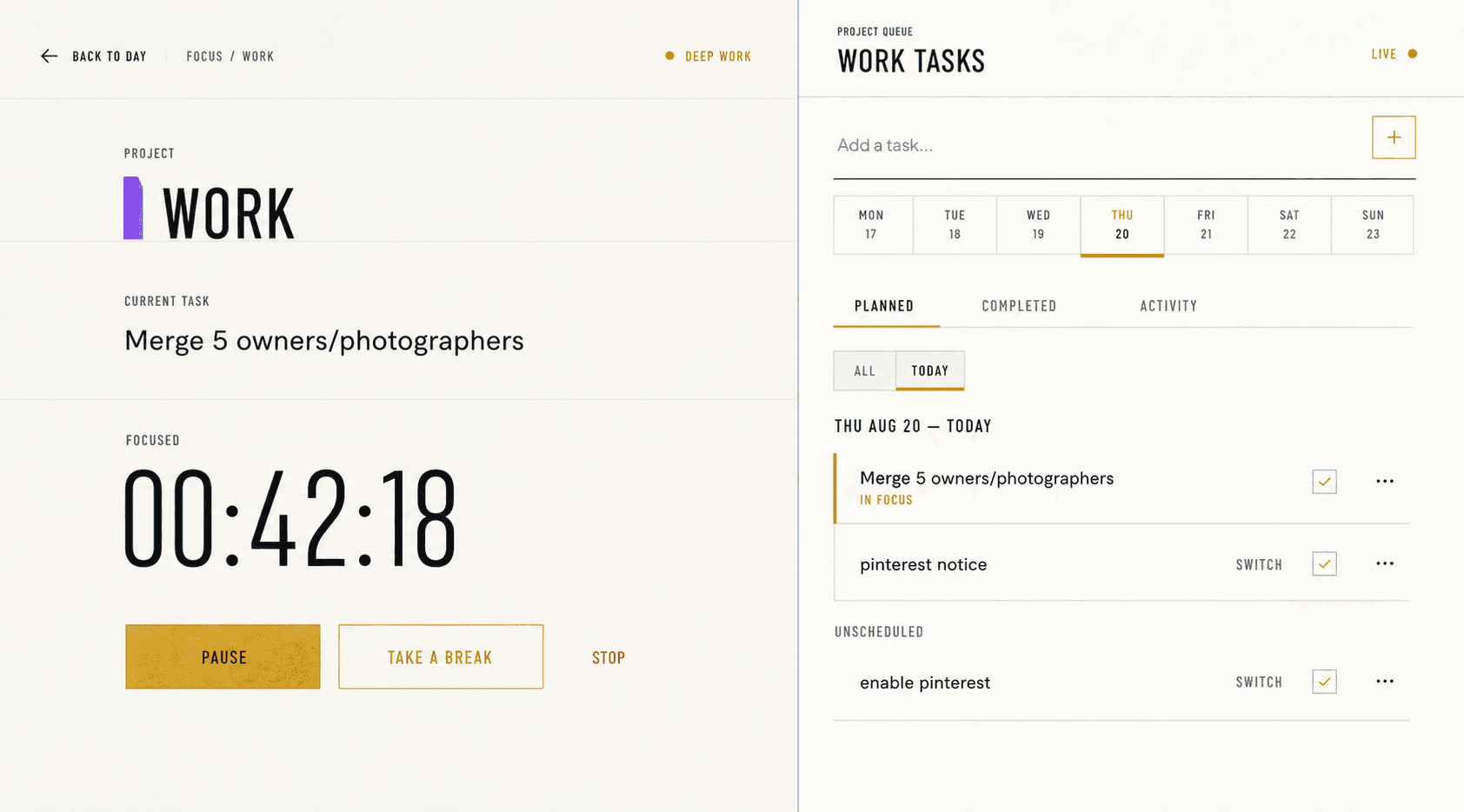
Let the task define the session, not an arbitrary alarm.
Pomodoro timers can be useful when a fixed interval helps you begin. Focused Work takes a different default: start from a real project task, see elapsed time, take an explicit rest, and preserve the result for review.
- Task-linked
- The active project and optional task remain visible for the full focus and rest lifecycle.
- Elapsed time
- No fake 25:00 default. The instrument shows only a real running or recorded duration.
- Distinct rest
- Recovery uses a different visual state and never masquerades as active work.
Start from the next action
Choose the task you intend to advance and start focus from its row. This preserves the connection between planning, execution, and later project review.
If the work changes, switch deliberately rather than leaving an unrelated timer running in the background.
Use rest as recovery
Pause into an explicit rest interval when you need to step away. The session remains recoverable and the task queue stays ready without counting rest as focused work.
Optional break reminders follow your chosen rhythm, but the interface does not shame you with missed streaks.
Review facts instead of rounds
Review shows focused time, completed tasks, project allocation, and planned-versus-actual budgets. It does not translate those facts into a fabricated productivity grade.
If fixed 25-minute rounds are essential to your method, a dedicated Pomodoro app may remain the better timer.